rabbitmqctl
Manages a RabbitMQ server: users, virtual hosts and permissions, queues and connections, plus the state of the node.
Syntax
rabbitmqctl COMMAND [-p VHOST] [ARGS]
Options
| Command | Description |
|---|---|
status |
State of the node: version, memory, alarms, listeners |
add_user, delete_user, change_password |
Manage users |
set_user_tags USER administrator |
Rights for the web interface |
add_vhost, list_vhosts |
Manage virtual hosts |
set_permissions -p VHOST USER CONF WRITE READ |
Permissions as regular expressions |
list_users, list_permissions -p VHOST |
Show users and permissions |
list_queues -p VHOST [COLUMNS] |
Queues with message counts |
purge_queue, delete_queue |
Empty or delete a queue |
list_connections |
Connected applications |
rabbitmqctl talks to the node over the Erlang distribution and needs the same .erlang.cookie. Run it with sudo; on Debian it switches to the user rabbitmq by itself.
Examples
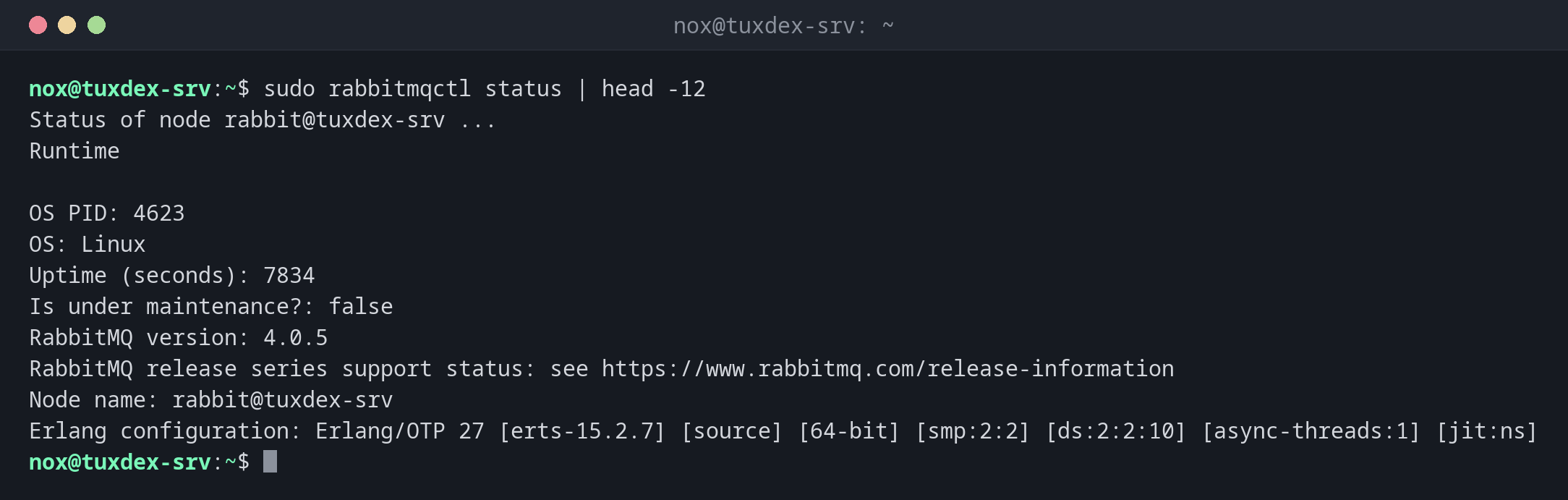
State of the node:
sudo rabbitmqctl status | head -12
Status of node rabbit@tuxdex-srv ...
Runtime

OS PID: 4623
OS: Linux
Uptime (seconds): 7834
Is under maintenance?: false
RabbitMQ version: 4.0.5
RabbitMQ release series support status: see https://www.rabbitmq.com/release-information
Node name: rabbit@tuxdex-srv
Erlang configuration: Erlang/OTP 27 [erts-15.2.7] [source] [64-bit] [smp:2:2] [ds:2:2:10] [async-threads:1] [jit:ns]
Set up an application: vhost, user, permissions:
sudo rabbitmqctl add_vhost shop
sudo rabbitmqctl add_user shop
sudo rabbitmqctl set_permissions -p shop shop '.*' '.*' '.*'
Adding vhost "shop" ...
Adding user "shop" ...
Done. Don't forget to grant the user permissions to some virtual hosts! See 'rabbitmqctl help set_permissions' to learn more.
Setting permissions for user "shop" in vhost "shop" ...
An admin account for the web interface:
sudo rabbitmqctl add_user nox
sudo rabbitmqctl set_user_tags nox administrator
sudo rabbitmqctl delete_user guest
Adding user "nox" ...
Done. Don't forget to grant the user permissions to some virtual hosts! See 'rabbitmqctl help set_permissions' to learn more.
Setting tags for user "nox" to [administrator] ...
Deleting user "guest" ...
Users and vhosts:
sudo rabbitmqctl list_users
sudo rabbitmqctl list_vhosts
Listing users ...
user    tags
nox    [administrator]
shop    []
Listing vhosts ...
name
shop
/
Queues with waiting messages and consumers:
sudo rabbitmqctl list_queues -p shop name type messages_ready messages_unacknowledged consumers
Timeout: 60.0 seconds ...
Listing queues for vhost shop ...
name    type    messages_ready    messages_unacknowledged    consumers
mails    quorum    3    0    1
orders    quorum    1482    0    0
1482 orders are waiting and no consumer is connected: the order worker isn't running.
Check a password:
sudo rabbitmqctl authenticate_user shop 'wrong'
Authenticating user "shop" ...
Error:
Error: failed to authenticate user "shop"
user 'shop' - invalid credentials
When do I need it?
- To set up a new application: vhost, user and permissions
- When messages pile up: which queue is full, are consumers connected?
- To remove the
guestuser on production systems
Watch the queue length
messages_ready that keeps rising while consumers is 0 means: the worker is down.
That's the most important value for monitoring a RabbitMQ server.
Passwords in the shell history
rabbitmqctl add_user shop secret ends up in the history. Leave the password out: then
rabbitmqctl reads it from standard input, and it stays out of the history.
purge_queue deletes unprocessed jobs
Purging deletes all waiting messages, such as orders or mails that haven't been sent yet. Make sure they are really obsolete.
Distribution differences
| Debian | Ubuntu | RHEL | Arch | |
|---|---|---|---|---|
| Package | rabbitmq-server |
rabbitmq-server |
not in the repositories: repository of the RabbitMQ team | rabbitmq |