popd
Removes the top directory from the stack and changes back to the next one.
Syntax
popd [-n] [+N | -N]
Options
| Option / argument | Description |
|---|---|
| (none) | Remove the top entry and change to the new top directory |
+N |
Remove entry N (counted from the left, starting at 0) without changing directory |
-N |
Same as +N, but counted from the right |
-n |
Only change the stack, do not change the directory |
The stack is filled with pushd and shown with dirs.
Examples
Go back to where you came from:
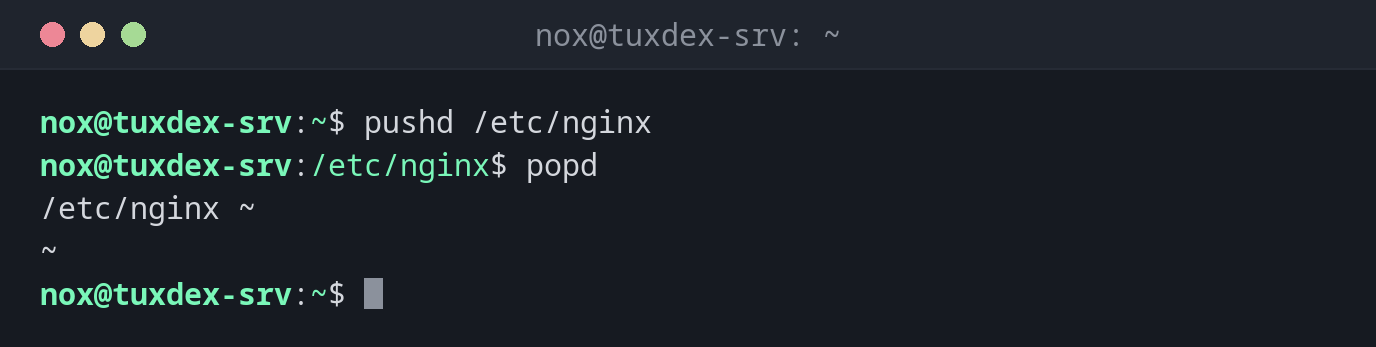
pushd /etc/nginx
popd
/etc/nginx ~
~
Work back through the stack step by step:
dirs
popd
popd
/var/log/nginx /etc/nginx ~
/etc/nginx ~
~
Remove an entry from the stack without changing directory:
dirs
popd +1
/var/log/nginx /etc/nginx ~
/var/log/nginx ~
Call popd on an empty stack:
popd
-bash: popd: directory stack empty
Work in another directory in a script and return afterwards:
pushd /var/www/example.com > /dev/null || exit 1
git pull
popd > /dev/null
Already up to date.
When do I need it?
- To return to your starting point after working in several directories with
pushd - In scripts that need to run a command in another directory and then continue where they were
- To clean up the directory stack (
popd +N)
Silence the output in scripts
pushd and popd always print the stack. In scripts, redirect it with
> /dev/null so that only the output of your own commands is visible.
popd without a matching pushd
If the stack is empty, popd fails and the directory stays the same. In scripts,
every pushd should have exactly one matching popd.